The Single Seat Nobody Buys
Leftover single seats cost a 300-seat theater thousands over a run. Here's the arithmetic, and how orphan seat prevention stops the click that strands them.
Stop selections that strand a single seat, clear categories without resetting the palette, select seats and areas in one drag, and a faster editor.
If you only read one paragraph: a seat map can now stop a buyer from leaving a single seat stranded with nobody beside it, and it shows them which seats go together before they click rather than after. You turn it on per organisation or per event from the editor. Everything else in this release is smaller — category tools for the admin renderer, section outlines that finally obey their zoom settings, a faster editor on large venues, and a run of editor fixes. If you self-host, the last section lists what to check.
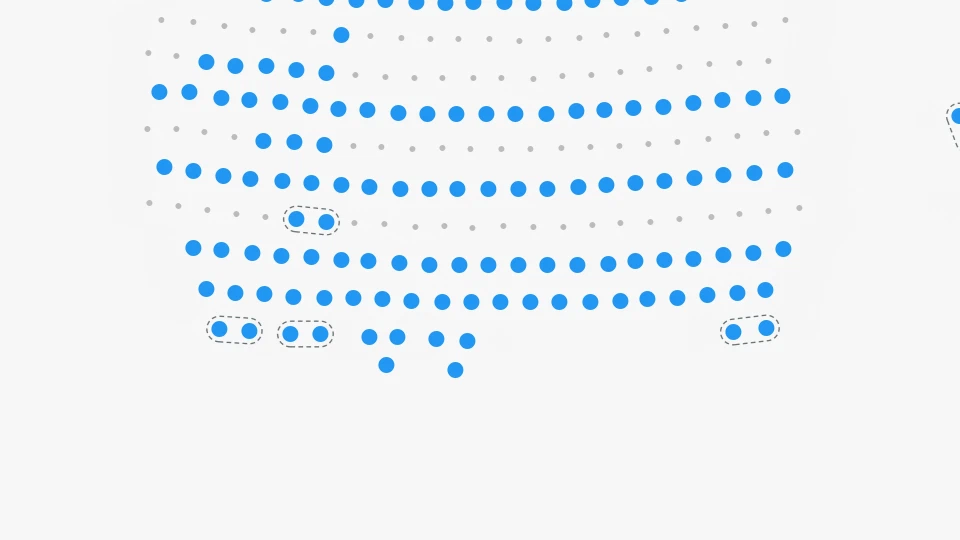
Every venue has them. A buyer takes two seats out of the middle of a row of five, and what is left is a pair and a single. The pair sells. The single sits there for the rest of the run.
Orphan seat prevention refuses that selection. It is off unless you turn it on, and when you do, three things happen.
Before any click, seats that can only be taken together get a dashed outline, so a buyer can see the constraint rather than discover it. Hovering a seat extends the outline over whatever else that seat would commit them to.
On the click, a selection that would strand a seat is completed with the extra seat rather than refused — take the one that would leave a neighbour alone and you get both. If you would rather decide yourself, implement onOrphanSeatsBlocked: you get the seats that would be stranded and a suggested adjustment, and you return true to accept it or false to turn the selection down and explain it in your own words.
const renderer = new SeatmapBookingRenderer(container, {
  publicKey: 'YOUR_PUBLIC_API_KEY',
  onOrphanSeatsBlocked: ({ orphaned, remedy }) => {
    if (!remedy) {
      toast(`Seat ${orphaned.join(', ')} would be left on its own.`);
      return false;
    }
    return confirm(`Add ${remedy.select.length} more seat(s) to keep the row sellable?`);
  },
});
And the lock and sale endpoints refuse the same seats, so what a buyer is shown and what checkout enforces cannot drift apart. Releasing seats is never restricted, and a buyer can always put the map back the way they found it — a seat that was already standing alone when they arrived is theirs to release.
Aisles are respected. A row is measured against its own seat spacing, so a wider gap in the middle ends the block: a seat beside an aisle is never held back by a seat on the far side of it, and an outline never spans the gap.
If your integration sends seats to lock one call at a time rather than all at once, tell it what the rest of the cart holds:
{
  "sessionId": "abc123xyz",
  "seats": [{ "seatId": 1004, "state": "LOCKED" }],
  "cartSeatIds": [1001, 1002, 1003]
}
The seats in the request and the seats in cartSeatIds are judged as one selection, so a cart that is sound as a whole is not refused half way through being assembled.
You turn all of this on from the editor — Settings > Organization for the organisation, and the event dialog for a single event, each offering Enabled, Disabled or Inherit. A change reaches the booking endpoints and newly loaded maps within seconds.
The admin renderer’s category calls got sharper. clearSeatsCategory(seats) and clearGaCategory(sections) remove a category from specific seats or areas, and resetSeatsCategories() and resetGaCategories() reset one side of the map without touching the other. resetCategories() still does everything, including clearing the shared colour palette — it is now the only call that does.
setGaCategory takes a list, the way setSeatsCategory always has, and both accept a category by name rather than by index:
renderer.setGaCategory(['Standing North', 'Standing South'], 'vip', '#c8a44a');
Two things changed meaning here, so check your code if you use them: setGaCategory(sections, 0) now assigns category 0 instead of clearing it — pass undefined to clear — and calling setSeatsCategory without a colour no longer throws away the colour you already registered for that category.
There is also a new marquee mode. renderer.setMode('selectMixed') selects seats and general admission areas in one drag, reporting each through the callback it already had.
visibilitySettings.outlines has been in the API for a while. It was being computed and never read, so outlines stayed painted at every zoom level and kept highlighting under the cursor on sections a buyer could no longer click.
Now visible decides whether outlines are painted at the current scale and selectable decides whether they answer the pointer — outside that range the click reaches the seats underneath. With the shipped defaults, outlines carry navigation below scale 0.66 and hand over to individual seats above it. If you want them everywhere, set visibilitySettings.outlines.visible to { from: 0, to: 20 }.
outlineVisibility works as documented too, per outline source, so a venue can keep its background-bound sections for navigation while suppressing generated ones. The old seatSelectionMinZoom is now eagleViewMaxZoom, which is what that number always controlled — the old name still works.
Selecting, deleting and marquee-selecting in very large schemas is noticeably quicker: the hot paths no longer scan the whole venue to answer a question about a handful of seats. Server data now flows through a caching layer, so switching organisation reliably refreshes every list rather than leaving the previous one on screen.
409 Conflict rather than a generic error, and every write endpoint declares it, so your client can retry deliberately.Self-hosted deployments have four things to look at, and none of them require a code change.
One migration runs at startup. It clears organisation and tenant configurations that are not JSON objects so they read as no configuration. It creates and alters nothing and takes no long-lived lock. If your migration role is restricted per table, confirm it holds UPDATE on organization and tenant first.
The Java services now run on Java 25 and Spring Boot 4.1. If you consume our published images this costs you nothing. If you build from source, you need JDK 25 — the Gradle wrapper handles the rest.
If you maintain your own ingress rather than using the chart’s booking.ingress.apiPaths, add /custom to the paths routed to the booking service, or the API explorer will not be reachable.
The client images now ask browsers to revalidate on each load, which is what makes a release land on the next reload. If you run a CDN or caching proxy in front of them, confirm it forwards that rather than overriding it with its own TTL.
Orphan seat prevention itself needs nothing: it is off until you enable it. If you do plan to enable it, upgrade the embedded renderer first — the buyer-facing outlines and the blocked-selection callback need 1.72.0 or newer.
The Helm deployment guide lists the new values. The full detail is in the release notes.
Leftover single seats cost a 300-seat theater thousands over a run. Here's the arithmetic, and how orphan seat prevention stops the click that strands them.
A 2026 buyer guide for event seating chart software: rendering, API surface, deployment, data residency, and pricing that survives a busy on-sale.
Section photos delivered to your ticketing site, prices and availability loaded separately, faster background conversion, and a lighter renderer.